Automate repetitive tasks
No more typing, clicking or dragging and dropping the same steps for every model in every project.
simplebim® 11 brings numerous fixes and usability improvements for existing users. But the real stars of this release are the brand-new BIM data flows: they are going to change the way you handle automation and centralisation of your BIM data. Your workflows and pipelines will never be the same again.
simplebim® 11 adds the missing piece to the lifecycle of your BIM data: its processing.
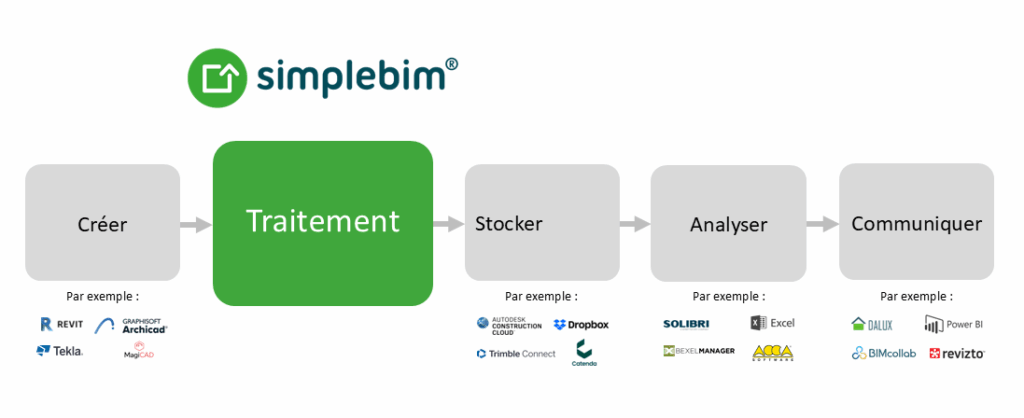
In the data industry, data flows are a well-established method for automatically cleaning, restructuring, enriching and validating raw data. simplebim® 11 adapts this concept to the unique challenges of BIM data — something generic tools cannot handle. The goal is simple: turn raw BIM data into meaningful, actionable information. Automatically.
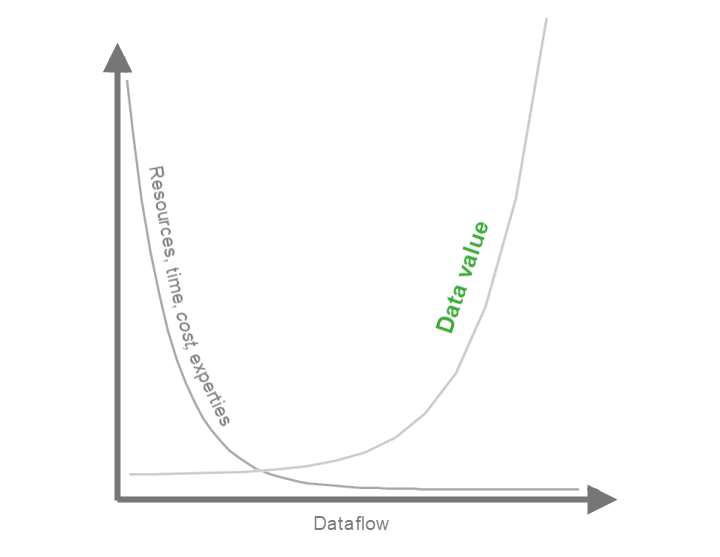
No more typing, clicking or dragging and dropping the same steps for every model in every project.
Less manual work, lower costs, faster results, fewer experts needed and the greatest value from your BIM data.
Mix and match more than 100 state-of-the-art tools and ready-made data flows to build your own custom sequence of actions.
An intuitive user interface for creating, testing and running your data flows, without writing a single line of code.
The principle is simple: select a data flow preset or a set of tools, configure them, then run them. Start small by cleaning a model or automatically creating submodels, or think big by enriching data with quantities, location information, classifications, derived objects, and more. Designed once, your data flows apply to models, updates or even entire projects — and you can share them across your organisation, or beyond.
Split objects, calculate quantities for spatial surfaces, find nearby objects, find duplicate objects, and many more.
Create groups by connection, optimise geometry, add coordinate information to objects, convert objects, and more.
Building elements are connected, but BIM data doesn't make those connections visible. simplebim® 11 makes it easy to create links between elements, even across different models and disciplines: nearby objects, elements in the same location, spatial surfaces and their parent spaces and elements, overlapping objects, derived and parent objects and more.
Use these connections to pass messages (copy data) between connected objects, calculate or aggregate properties, or group elements based on their relationships. By combining these techniques in your data flows, you open up endless possibilities.
A simplified button for importing or opening your model invites you to get started faster.
A default workspace with all the essentials, including the new Data flows palette. Classic workspaces remain available.
Switch on Triage mode to pare down objects and properties, then return to normal mode and carry on with cleaner data — without changing workspace.
Clearer Home and 3D tabs, a tab dedicated to 3D modelling (measurement objects, location prisms) and a tab for the Data flows palette.
Choose the number of 3D windows more easily and enjoy a faster, more intuitive 3D toolbar.
The ribbon, tools and data flows are available in English.
simplebim® 11 is just the beginning for data flows: upcoming releases will bring even more ready-made flows, new tools and simplebim® Cloud integration. Keep your simplebim® up to date!
30-minute demo, quote or question: reply within 2 working days.
Stéphane DUSSOL
Directeur — CADatWORK Learning